Part Visuals - Upload or AI-Generated Images & 3D CAD Files
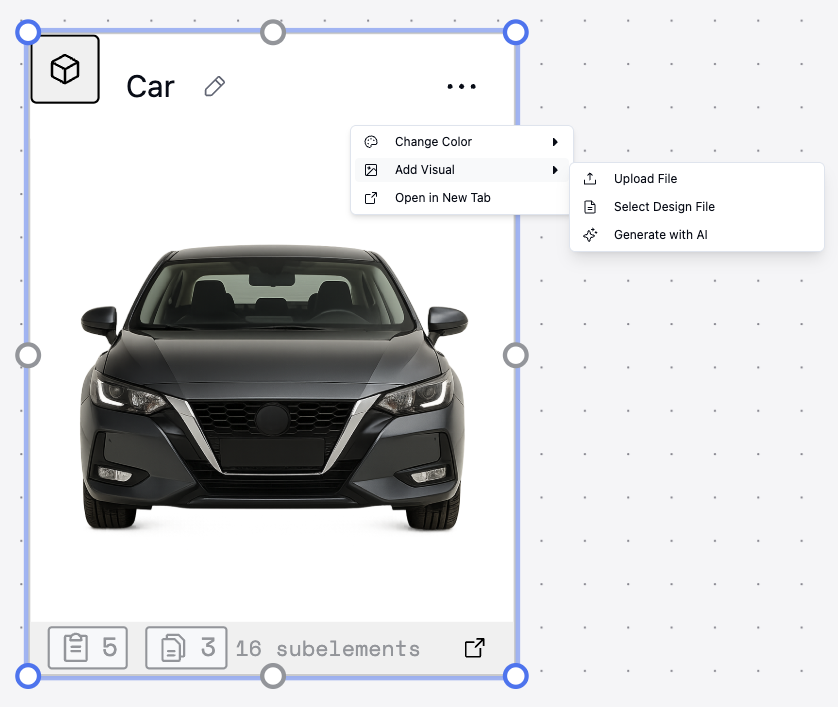
Attach images directly to parts to make diagrams clearer and more expressive. You can upload your own or generate images with AI.
How to use it:
- Select any node in your model
- Open the node menu (three dots) and choose Add Visual
- Upload File — attach a raster image (PNG/JPG)
- Select Design File — add a 3D model or supported preview to display inline on the canvas
- Generate with AI — ask Copilot to produce an image for the node
- Resize the node to fit your layout; for 3D assets you can pan/zoom in the preview
Improvements
- Autoscroll only when you're at the bottom during streaming
- Deleted-thread autoloads next thread messages
Fixes
- Stability improvements to collaboration
- Addressed a rare issue updating user subscriptions