Requirements Table — Group, Sort, Show/Hide, Expand/Collapse
Quickly organize large requirement sets and focus on what matters.
How to use it:
- Access the Requirements Table from Left Sidebar > Pages > Requirements
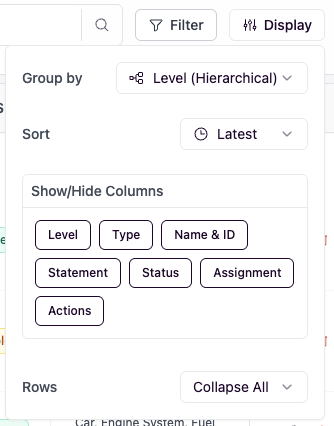
- Click on the Display button
- Group or sort requirements by clicking the Group by or Sort buttons
- Show or Hide columns by toggling the columns under Show/Hide Columns
- Expand or collapse requirement rows by clicking Expand all or Collapse all
Improvements
- Requirement text fields now support hyperlinks for fast navigation
- Added Notes field to all element types for better documentation
- Multi-line charts for richer data visualization
- Model name/rename input validation prevents invalid names
- Creation date now shown on model previews; snapshots list handles overflow
- Action node execution is more reliable; better variable field sizing
Fixes
- Snapshot bugs fixed, including double snapshot edge cases and quick-restore stability
- Cut/paste undo/redo behavior corrected
- Contact form and small login demo link issues resolved